Showing posts with label console. Show all posts

July 29, 2022

New Red binaries

Since many years, we are offering pre-built binaries for the Red toolchain, as a more convenient way to use Red, even if it is not strictly needed, as Red can be run from its sources, the toolchain being run by a Rebol2 interpreter. As the Red REPL and toolchain are not run by the same engine, the console (REPL) used to be compiled on first run of the `red` executable (when no arguments was provided or a Red script was passed). This resulted in a significant delay on the first use of the console (both for the GUI and CLI versions). 

We have now decided to change that by providing separate pre-built binaries for the consoles and toolchain. This is a temporary split until Red gets self-hosted, at which point we can recombine everything into a single binary.

Another change is the temporary dropping of the semantic versioning until version 1.0 and related "stable" releases, as it seems to be too confusing to some users (Red being still in alpha stage). This also will remove a tendency from some users to care more about version increments than feature availability and work being done overall. We will now be proposing only pre-built binaries for latest commit, though older binaries will still be available if that can be of any help to anyone.

So the pre-built binaries now are:
  • Red GUI : Red interpreter + View + GUI console
  • Red CLI : Red interpreter + CLI console
  • Red Toolchain : Encapper for Red + Red/System compiler

We are also considering ways to merge the GUI and CLI consoles into a single binary which can work even if no GUI API is available, falling back on CLI mode. We will also have the console(s) act as a front-end for the toolchain, even downloading it for you in the background when needed. Though for that we need a proper asynchronous `call` function implementation. More news about this soon.

In the meantime, enjoy running Red consoles almost instantly from just a click on the Download page!


December 17, 2016

Incursion into "explorable explanations" lands

A few days ago, Nicky Case released an amazing piece of work in form of an interactive guide to alternative voting systems. This work follows the track of Brett Victor's famous research on explorable explanations and immediately caught our eyes because it is a very good match for the capabilities of our reactive native GUI system. We decided to replicate some of Nicky's interactive explanations in Red and see how it goes. The results are pretty amazing, as it was not only relatively easy to design and code (about 8 hours in total and ~280 LOC) but also great fun! Here is the result:


You can, of course, try it yourself by using the latest build from the master (or macGUI) branch or, preferably, one of the prebuilt consoles:
Put the console executable in the source code folder, run it and from the prompt, just type:
    red>> do %ballots.red
For Linux folks, sorry guys, the GUI support is not yet ready for prime time, though in the meantime, you could use Wine, Red GUI usually runs just fine on it.

Notes for macOS users:
  • You need to `chmod +x` the binary before running it from the terminal.
  • When dragging a face quickly, it can lag behind. The macOS GUI backend is still in a development branch, and still need some work to optimize animation latencies.

Implementation notes

The Red version implements only the "model1" and "ballot1" to "ballot4" interactive explanations. The rest could also be easily done in the same way, though we used up all our spare time for that as we are now focussing on the Red 0.6.2 release.

The colored shapes are images in the web version, but instead we chose to draw them using our 2D vector DSL in the Red version. Overall, the Red version is really small, about 25-45 LOC per screen, 85 LOC for the helper code and 2D shapes. All things considered, it is significantly smaller than the web version:
This is an interesting result, as the web version uses only plain JS, no third-party framework (with the exception of the almost weightless minipubsub). The counted JS code could maybe be shortened (excluding minification) though it already looks pretty simple to me, containing very few comments, doing mostly calculations and canvas drawing. I doubt it could be reduced significantly (any thoughts from expert JS readers about that?).

Final thoughts

This fun experiment shows that Red has the potential to be a great match for explorable explanations and other similar reactive interface needs. We hope that this demo will inspire the Red community to dig more in that direction and see what gems are lying there. For example, learning Red using such interactive visual approach would be great, don't you think so? ;-)

June 29, 2016

0.6.1: Reactive Programming

Despite being a minor release, 0.6.1 still weighs a heavy 588 commits with a big number of fixes and many additions, among which the new reactive framework is the most notable.

Last release introduced, for the first time in the Rebol world, a reactive programming framework, as a part of the GUI engine. While working on improving it, we realized that it could actually be easily generalized beyond GUIs, with just minor changes to its design and implementation.

What is reactive programming?

Let me make a short disclaimer first, this is not yet-another-FRP framework relying on event streams. The reactive model we use is known as object-oriented reactive programming (using a "push" model), which is both simple to understand and close to spreadsheet's model (i.e. Excel formulas). That model has often been praised for its simplicity and efficiency. You can now use it directly in Red.

So, in practice, what is it?  It is a way to link one or more object fields to other fields or global words, by specifying relationships in a block of code (can be a single expression or a complex multi-step computation). Each time a source field value changes, the target value is immediatly updated, you don't have to call a function for that, it's pretty much define-and-forget. ;-) Here's a simple example in Red:
    red>> a: make reactor! [x: 1 y: 2 total: is [x + y]]
    == make object! [
        x: 1
        y: 2
        total: 3
    ]
    red>> a/x: 5
    == 5
    red>> a/total
    == 7
    red>> a/y: 10
    == 10
    red>> a/total
    == 15
In that example, the is infix function is used to create a reactive relation between the total field and the x and y ones using a simple formula. Once set, total is refreshed automatically and asynchronously each time the other fields are changed, regardless how, where or when they are changed! It's the same concept as spreadsheet cells and formulas, just applied to object fields.

This reactive programming style belongs to the dataflow programming paradigm. It doesn't enable you to write code, that you wouldn't otherwise be able to write in an imperative style. Though, it helps reduce the size and complexity of your code, by abstracting away the "how" and helping you focusing more on the "what" (not dissimilar to FP). The gains of such approach become significant when you chain together many relations, creating graphs of, more or less complex dependencies. GUI programming is where it shines the most, as nodes are visible objects, and reactions produce visible effects.

Here is a comparative example with a reactive GUI vs the non-reactive version:

Let's make a simple native GUI app using VID, Red's graphic DSL (we call it a dialect). It will just provide 3 sliders, which control the R, G, B components of the box's background color.


The reactive version:
    to-int: function [value [percent!]][to integer! 255 * value]
    
    view [
        below
        r: slider
        g: slider
        b: slider
        base react [
            face/color: as-color to-int r/data to-int g/data to-int b/data
        ]
    ]
The non-reactive version:
    to-int: function [value [percent!]][to integer! 255 * value]
    
    view [
        below
        slider on-change [box/color/1: to-int face/data]
        slider on-change [box/color/2: to-int face/data]
        slider on-change [box/color/3: to-int face/data]
        box: base black
    ]
What can we say about the non-reactive version?
  1. Size is pretty much the same, though the non-reactive version has more expressions and code looks denser.
  2. The updating code is spread over 3 event handlers.
  3. The face word in each handler refers to the widget, so we can remove the slider names (very minor gain though).
  4. The box face needs a name (`box`), so it can be referred to, from the event handlers.
  5. The box face default color is grey, so it needs a `black` keyword to force it to the right default color (as the sliders are all at position 0 on start). The reactive version sets the right color on start, no need to care about it.

Even in this simple example, we can see that the complexity, and the cognitive load are higher in the non-reactive version. The more relationships can be modeled using reactions in a GUI app, the higher the gains from using the reactive approach.


Red reactive framework

Red's reactive framework is just ~250 LOC long, and written purely in Red (no Red/System). It relies on object events (equivalent to observables in OO languages) and the ownership system (which will be properly documented once completed in one or two releases time). Rebol does not offer any past experience in such domain to guide us, so it should still be considered experimental, and we need to put it to the test in the wild, to study the pros/cons in real-world applications. We are quite excited to see what Red users will create with it.

Full documentation for the reactive framework is available here. It also explains the important difference between static and dynamic relations.

In a nutshell, the reactive API provides 4 functions (quite big API by our standards):

  • react to create or remove reactions.
  • is infix function for creating reactions which result will be assigned.
  • react? to check if an object's field is a reactive source.
  • clear-reactions to remove all existing reactions.

Moreover, react is directly supported as a keyword from VID dialect. That's all you need! ;-)

Here is a simple demo linking together a couple dozen balls, following each other. Source code is available here.


Let's now have a look at other features brought by this release.

Time! datatype

A time! datatype is now included in Red, supporting already a broad range of features, like:
  • Path accessors: /hour, /minute, /second.
  • Math operators, including mixing with other scalar types.
  • All comparison operators.
  • Actions: negate, remainder, random, pick.
    red>> t: now/time
    == 12:41:52
    red>> t + 0:20:00
    == 13:01:52
    red>> t/second
    == 52.0
    red>> t/hour: t/hour - 5
    == 7
    red>> t
    == 7:41:52

GUI changes

Two main additions to our View engine have enabled the writing, or porting, of some nice graphic demos (thanks to Gregg Irwin for the awesome demos!). Here are a few examples:

Bubble demo

Gradient Lab

Particles demo


View engine changes
  • New time event in View, triggered by timers.
  • New rate facet in face! objects for setting timers.
  • move action allows to move faces between panes in a non-destructive way.
  • Adds support for event/window property.
  • data syncing with text for field and text faces.
  • Add default option for fields (e.g. options: [default 0]).
  • at, skip, pick, poke, copy on image! now accept pair! index argument.
  • Added /argb refinement for image! datatype.
  • Added request-font dialog.
  • Improved size-text native.
  • GUI console faces are now excluded from the View debug logs.

Draw dialect changes
  • fill-pen has been extended to support color gradients.
  • pen accepts `off` as argument now, to make the subsequent pen-related operations invisible.
  • Allows box to accept edges in reverse order.
  • Radius of circle now accepts a float! value.
  • Added key-color support for to image command.

VID dialect changes
  • Added rate keyword for setting timers.
  • do command now support `self` to refer to container face (window or panel).
  • Added focus option to faces for presetting focus.
  • Added select option support to preselect an item in a list (using an integer index).
  • Added default option support for field and text faces' default data facet value.
  • Added support for get-words to pass an handler function as an actor.
  • Adding glass and transparent color definitions.

The red/code repository has also been filled with more demos using the new features, like color gradients and timers.

Other changes

New actions: change, move

New natives: remove-each, new-line, new-line?, set-env, get-env, list-env, context?, enbase, now/time, browse

New functions: repend, overlap?, offset?, any-list?, number?, react, is, react?, clear-reactions, dump-reactions, make-dir, request-font, time?

Parse improvements
  • Added change command.
  • remove also accepts, now, a position argument.
  • Support for parsing binary! series.
  • Several bugs fixed.
Syntax for change command:
  • CHANGE rule value
  • CHANGE ONLY rule value
  • CHANGE rule (expression)
  • CHANGE ONLY rule (expression)
  • CHANGE pos value
  • CHANGE ONLY pos value
  • CHANGE pos (expression)
  • CHANGE ONLY pos (expression)
Example using rule syntax:
    a: "12abc34"
    alpha: charset [#"a" - #"z"]
    parse a [some [to alpha change [some alpha] dot]]
    a = "12.34"
Example using pos syntax:
    a: "12abc34"
    alpha: charset [#"a" - #"z"]
    parse a [some [to alpha b: some alpha change b dot]]
    a = "12.34"

Console improvements
  • Filenames completion using TAB key.
  • Font and color settings from new menu bar.
  • Ctrl-K will erase to end of line (CLI console).
  • Ctrl-D will remove character or exit like Ctrl-C if empty line (CLI console).
  • Optimized speed of pasted code in console.
Other improvements
  • Allows bitsets to be used as search pattern for find on any-string! series.
  • /next refinement support for do and load.
  • /seek and /part refinements added to read.
  • Added any-list! typeset.
  • Added /with refinement to pad function.
  • Improved split function (though not final version).
  • Added LF <=> CRLF conversions support to UTF-16 codec.
  • input can now read from stdin when run from  a child process.
  • Added /same refinement into find and select actions.
  • Added binary! support for data and HMAC key to checksum.
  • Reduced emitted code for setting struct members to float literals on IA-32.
  • Allows owned property to be used by modify on objects.
  • Compiler now accepts creating global op! values from object's functions.

A big number of tickets have also been processed, 110 bug fixes have been provided since 0.6.0 release. We have about 10% of open tickets which is more than usual, though not surprising after the last huge release, but only 22 are actual bugs. Thanks for all the contributors who reported the issues and helped fix them, Red owes you a lot!


What's next?

On the road to Android support, we need to be able to properly wrap a Red app in a shared library, which is the main focus for the next release. Moreover, being able to build the Red runtime library only once, will greatly reduce compilation time (the runtime library is currently rebuilt on each compilation). As the work on this new feature is already quite advanced, we expect next release to occur during July, even if we always favor quality over arbitrary deadlines. ;-)


In the meantime, enjoy the new release!

March 25, 2016

0.6.0: Red GUI system

Five years ago, when I started writing the first lines of code of what would become later the Red/System compiler, I had a pretty good picture already of what I wanted to achieve with Red, and all the ideal features that should be included, just not sure how much time and efforts it would require to have them. Two years and half ago, baby Red printed its first output. And today, we celebrate a major step forward with the addition of a brand new GUI system entirely written in Red itself! What a journey!


Here it is, the long awaited 0.6.0 release with its massive 1540 commits! The major new features are:
  • View engine, with Windows backend (from XP to 10)
  • VID dialect
  • Draw dialect
  • Reactive GUI programming
  • GUI console
  • Simple I/O support for files and HTTP(S) queries.
  • Codecs system with following codecs available: BMP, GIF, JPEG, PNG
  • Objects ownership system

All those additions made our Red executable grow from 767 KB to 910 KB (Windows platform), sorry for the extra 143 KB, we will try to [red]uce that in the future. ;-)

Let's start with the elephant in the room first, the GUI system. Here is an architecture overview:

Only the Windows backend is fully usable for now, Android and OS X are work-in-progress, Linux (using GTK) will follow soon, iOS will come later this year. Also, we have other targets in mind, like JS/HTML which are not scheduled yet, but could come this year too.

Red/View

First let me mention that View, VID and Draw were invented by Carl Sassenrath (of Amiga fame) in the Rebol language, a long time ago. Red's version retains all the best features and pushes the boundaries of simplicity even further. The main features of our View engine are:
  • A live updating mode that reduces the need to a single view function in most cases.
  • Full abstraction over rendering backends.
  • Two-way binding using live objects.
  • Event bubbling/capturing stages.
  • Built-in drag'n drop support for most face types.
  • Gestures support (experimental).
  • Native widgets support.
  • Full integration with the OS features.
  • Flexible backend support that can be mapped to virtually any kind of UI library.

The current list of supported widgets is: base, text, button, check, radio, field, area, text-list, drop-list, drop-down, progress, slider, camera, panel, tab-panel, group-box.

Next releases will bring more widgets, like: table, tree, divider, date/time picker, web-view and many others!

For more info about View, see the View reference document.

Main differences between Red/View and Rebol/View are:
  • Red relies on native widgets, Rebol has custom ones only, built over a 2D vector library.
  • Red faces are synchronized with their widgets on display in realtime by default, Rebol faces require manual calls to many functions for keeping faces and widget updated.
  • Red introduces reactive GUI programming.

Red/View will update both face and graphic objects in realtime as their properties are changed. This is the default behavior, but it can be switched off, when full control over screen updates is desirable. This is achieved by:
    system/view/auto-sync?: off
When automatic syncing is turned off, you need to use show function on faces to get the graphic objects updated on screen.

VID dialect

VID stands for Visual Interface Dialect. It is a dialect of Red which drastically simplifies GUI construction. VID code is dynamically compiled to a tree of faces, feeding the View engine. You can then manipulate the face objects at runtime to achieve dynamic behaviors. VID offers:
  • Declarative programming.
  • Automatic layout system.
  • Cascading styles.
  • Default values for...everything.
For more info about VID, see the specification.

In case you are reading about Red or Rebol for the first time, here are a few code demos to show how simple, yet efficient, is our approach to GUI programming:

A GUI Hello word
    view [text "Hello World"]
Greet the name you type in the field
    view [name: field button "Hi" [print ["Hi" name/text]]]
A simple reactive relations demo, drag the logo around to see the effect
   view [
        size 300x300
        img: image loose http://static.red-lang.org/red-logo.png
        return
        shade: slider 0%
        return
        text bold font-size 14 center "000x000" 
            react [face/text: form img/offset]
            react [face/font/color: white * shade/data]
    ]
 
Simple form editing/validating/saving with styles definitions
   digit: charset "0123456789"
    view [
        style label: text bold right 40
        style err-msg: text font-color red hidden
    
        group-box "Person" 2 [
            origin 20x20
            label "Name" name: field 150
            label "Age"  age:  field 40
            label "City" city: field 150
            err-msg "Age needs to be a number!" react later [
                face/visible?: not parse age/text [any digit]
            ]
        ]
        button "Save" [save %person.txt reduce [name/text age/text city/text]]
    ]
    set [name age city] load %person.txt
    ?? name ?? age ?? city

You can run all those examples by copy/pasting them one-by-one into the Red console for Windows. To get the console, just download it and double-click the Red binary, wait ~20 seconds for the console to be compiled for your OS (yes, that little file contains the full Red toolchain, runtime library and console source code), paste the code and have fun. ;-)

Draw dialect

Draw is a 2D vector-drawing dialect which can be used directly, to render on an image, in faces for local rendering, or specified through VID. It is still a work in progress as not all features are there yet. We aim at full Rebol/Draw coverage and full SVG compatibility in the not-too-distant future.

A simple example of Draw usage:
    shield: [
        fill-pen red   circle 50x50 50
        pen gray
        fill-pen white circle 50x50 40
        fill-pen red   circle 50x50 30
        fill-pen blue  circle 50x50 20
        
        pen blue fill-pen white
        polygon 32x44 45x44 50x30 55x44 68x44 57x53 60x66 50x58 39x66 43x53
    ]
    
    ;-- Draw in a draggable face, in realtime.
    view [
        size 300x300
        img: box 101x101 draw shield loose
        at 200x200 base white bold react [
            [img/offset]
            over?: overlap? face img
            face/color: get pick [red white] over?
            face/text: pick ["Hit!" ""] over?
        ]
        button "Hulk-ize!" [replace/all shield 'red 'green]
        button "Restore"   [replace/all shield 'green 'red]
    ]
Copy/paste the above code example in a Red console on Windows, and become an Avenger too! ;-)

For more info about Draw, see the specification.

Main differences between Red/Draw and Rebol/Draw:
  • Red does not yet cover all the commands of Rebol/Draw yet.
  • Red's version allows commands to be grouped in blocks, ease-ing insertion/removal at run-time.
  • Red's version allows commands to be prefixed with a set-word, allowing to save local position in Draw blocks in a word.

Reactive GUI programming

This is a deep topic which should be part of a future separate blog article. So, I will just copy/paste here the little information already in the VID documentation:

Reactions (or reactors, not sure yet which terms is the most accurate) are created using the react keyword, directly from Red code or from VID dialect. The syntax is:
    react [<body>]
    
    <body> : regular Red code (block!).
This creates a new reactor from the body block. When react is used in VID, as a face option, the body can refer to the current face using face word. When react is used globally, target faces need to be accessed using a name.

Reactors are part of the reactive programming support in View, whose documentation is pending. In a nutshell, the body block can describe one or more relations between faces properties using paths. Set-path setting a face property are processed as target of the reactor (the face to update), while path accessing a face property are processed as source of the reactor (a change on a source triggers a refresh of the reactor's code).

Basically, it is about statically-defined relations between faces properties, without caring when or how the reactive expressions will be evaluated. It will happen automatically, when needed. Here are a couple of examples you can copy/paste in the Red console on Windows:

Make a circle size change according to slider's position:
    view [
        sld: slider return
        base 200x200 
            draw  [circle 100x100 5]
            react [face/draw/3: to integer! 100 * sld/data]
    ]

Change the color of a box and a text using 3 sliders:
    to-color: function [r g b][
        color: 0.0.0
        if r [color/1: to integer! 256 * r]
        if g [color/2: to integer! 256 * g]
        if b [color/3: to integer! 256 * b]
        color
    ]

    to-text: function [val][form to integer! 0.5 + 255 * any [val 0]]

    view [
      style txt: text 40 right
      style value: text "0" 30 right bold
    
      across
      txt "Red:"   R: slider 256 value react [face/text: to-text R/data] return
      txt "Green:" G: slider 256 value react [face/text: to-text G/data] return
      txt "Blue:"  B: slider 256 value react [face/text: to-text B/data]
    
      pad 0x-65 box: base react [face/color: to-color R/data G/data B/data]
      return
    
      pad 0x20 text "The quick brown fox jumps over the lazy dog." font-size 14
        react [face/font/color: box/color]
    ]


GUI console

We have a GUI console now, in addition to the existing CLI one!

The GUI console is now the default on Windows platform, and is fully Unicode-aware. The system shell (DOS) console is still available using --cli option:
    red --cli
The GUI console is still in its infancy and will be enhanced a lot in future releases. Anyway, so far, it already supports:
  • history of commands
  • completion on words and object paths
  • multi-line editing for blocks, parens, strings, maps and binaries.
  • navigation using HOME and END keys
  • select/copy/paste using the mouse and keyboard shortcuts
  • auto-scrolling when selecting with the mouse out of the boundaries
  • very fast text rendering
  • automatic vertical scroll bar
  • customizable prompt
Try this cool one-liner for making the prompt more active:
    system/console/prompt: does [append to-local-file system/options/path "> "]

This is how the GUI console looks like:


Simple I/O support

In order to have really some fun with the GUI, we have added some minimal support for blocking IO basic actions covering files and HTTP(S) requests. read and write action are available now. Their /binary, /lines and /info refinement are working. do, load, save have also been extended to work with files and urls.

When not using /binary, read and write are expecting UTF-8 encoded data. Support for ISO8859-1 and other common encoding formats will be available in next release.

The full IO will come in 0.7.0 with ports, full networking, async support and many more features.

Codecs

Codec system support has made his entrance in this release. It is a very thin layer of encoders/decoders for binary data, integrated with load, save and actions which rely on /as refinement. load and save will auto-detect the required encoding format and try to apply the right encoder or decoder on the data.

Currently only image format codecs are provided: BMP, PNG, GIF, JPEG. Any kind of encoding (related to IO) is a good candidate for becoming a codec, so expect a lot of them available in the future (both built-in Red runtime and optionaly installable).

For example, downloading a PNG image in memory, and using it is as simple as:
    logo: load http://static.red-lang.org/red-logo.png
     
    big: make font! [name: "Comic" size: 20 color: black]
    draw logo [font big text 10x30 "Red"]
    view [image logo]
Saving a downloaded file locally:
    write/binary %logo.png read/binary http://static.red-lang.org/red-logo.png
Saving images is not fully functional yet, PNG should be safe though.

Objects ownership system

Red's objects ownership system is an extension of object's event support introduced in previous releases. Now, an object can own series it references, even nested ones. When an owned series is changed, the owner object is notified and its on-deep-change* function will be called if available, allowing the object to react appropriately to any change.

The prototype for on-deep-change* is:
    on-deep-change*: func [owner word target action new index part][...]
The arguments are:
  • owner: object receiving the event (object!)
  • word: object's word referring to the changed series or nested series (word!)
  • target: the changed series (any-series!)
  • action: name of the action applied (word!)
  • new: new value added to the series (any-type!)
  • index: position at which the series is modified (integer!)
  • part: number of elements changes in the series (integer!)
Action name can be any of: random, clear, cleared, poke, remove, removed, reverse, sort, insert, take, taken, swap, trim. For actions "destroying" values, two events are generated, one before the "destruction", one after (hence the presence of cleared, removed, taken words).

When modifications affect several non-contiguous or all elements, index will be set to -1.
When modifications affect an undetermined number of elements, part will be set to -1.

Ownership is set automatically on object creation if on-deep-change* is defined, all referenced series (including nested ones), will then become owned by the object. modify action has been also implemented to allow setting/clearing ownership post-creation-time.

As for on-change, on-deep-change* is kept hidden when using mold on object. It is only revealed by mold/all.

Here is a simple usage example of object ownership. The code below will create a numbers object containing an empty list. You can append only integers to that list, if you fail to do so, a message will be displayed and the invalid element removed from the list. Moreover, the list is always sorted, wherever you insert or poke a new value:
    numbers: object [
        list: []
    
        on-deep-change*: function [owner word target action new index part][
            if all [word = 'list find [poke insert] action][
                forall target [
                    unless integer? target/1 [
                        print ["Error: Item" mold target/1 "is invalid!"]
                        remove target
                        target: back target
                    ]
                ]
                sort list
            ]
        ]
    ]
    
    red>> append numbers/list 3
    == [3]
    red>> insert numbers/list 7
    == [3 7]
    red>> append numbers/list 1
    == [1 3 7]
    red>> insert next numbers/list 8
    == [1 3 7 8]
    red>> append numbers/list 4
    == [1 3 4 7 8]
    red>> append numbers/list "hello"
    Error: Item "hello" is invalid!
    == [1 3 4 7 8]
    red>> numbers
    == make object! [
        list: [1 3 4 7 8]
    ]
Object ownership is deeply used in Red/View, in order to achieve the binding between face objects and the widgets on screen, and the automatic "show-less" synchronization. 

The work on this is not yet completed, more object events will be provided in future releases and the ownership support extended to enable objects to own more datatypes. More documentation will be provided once the work on that will be finished. In the future, its use will be extending to other frameworks and interfaces. Such "reactive objects" will be called "live objects" in Red's jargon.

Red/System changes
  • Full stack traces in debug mode on runtime errors.
  • New compilation directive: #u16 (literal UTF-16LE strings support).
  • Added log-b native function for getting the binary logarithm of an integer.
  • Added equal-string? runtime function for testing c-string! equality.
  • Several improvements to some compiler errors reporting accuracy.
  • Improved function! type support.
  • New compilation option: debug-safe? (for safer stack traces)
  • New --catch command-line option for console to open on script errors.
  • Improved compilation speed of variables assignment.
  • Fixes for broken exceptions support on ARM backend.

Additions to the Red runtime library

New functions

  • show, view, unview, draw, layout, react, size-text, to-image, do-events, dump-face, within?, overlap?, remove-reactor, set-flag, find-flag?, center-face, insert-event-func, remove-event-func.
  • event?, image?, binary?.
  • debase, wait.
  • request-file, request-dir.
  • read, write, exists?, to-local-file, to-red-file, dirize, clean-path, split-path.
  • what-dir, change-dir, list-dir.
  • also, alter, extract, collect, split, checksum, modify, unset.
  • as-color, as-rgba, as-ipv4.
  • cd, ls, ll, pwd, dir. (console-only)
Use help in the console to get more information about each function.

New datatypes

  • binary!
  • event! (Windows only for now)
  • image! (Windows only for now)

Binary! datatype supports all the series actions. Literal base 2, 16 and 64 encodings are available:
    red>> 2#{11110000}
    == #{F0}
    red>> to string! 64#{SGVsbG8gV29ybGQh}
    == "Hello World!"
Event! and image! are a work-in-progress, though image! is already very capable (documentation will be added soon).

Other changes

o set and get native improvements:

If A and B are object values, set A B will now set the values in A from B, for the fields they have in common (regardless of the fields definition order in the objects).

Added /only and /some refinements:
  • /only: set argument block or object as a single value
  • /some: `none` values in the argument block or object are not set

o Icons and other "resources" are now supported for inclusion in Windows executables. They can be set from Red's main script header, these are the currently supported options:

  • Icon: file! or block! of files
  • Title: string!
  • Author: string!
  • Version: tuple!
  • Rights: string!
  • Company: string!
  • Notes: string!
  • Comments: string!
  • Trademarks:  string!

If no Icon option is specified, a default Red icon will be provided.

o index? action is now allowed on words. It will return the word's index inside a context or none if the word is unbound. This is a shortcut for the following idiom:
    index? find words-of <object> <word>
 
o Remaining list of changes:

  • Implemented type-checking for infix operators in the interpreter.
  • Implemented native! functions type-checking support when called by compiled code.
  • Added system/state/trace? for enabling/disabling call stack traces on errors.
  • system/options/args gets the command-line string.
  • Added DO/ARGS support.
  • Error report for catchable infinite block rules recursions in Parse.
  • Added limits to Parse stack to avoid eating up all the memory.
  • Auto-conversion of float values in routines.
  • Big series (> 2MB) support enabled.
  • Lexer support for base2 and base64 encoding.
  • DO and LOAD work on file! and url! values now.
  • Added support for cycles detection for MOLD/FORM and comparisons.
  • Support for set operations on hash!.
  • SORT works on paren! now.
  • string! to issue! conversion support.
  • file! to string! conversion support.
  • Allowed float! values as arguments to AS-PAIR and MAKE pair!.
  • Added percent! support in vector! series.
  • Added matching typesets support to Parse.
  • Added PUT support to object! and any-series!.
  • Added support for make bitset! <binary>
  • Setting a tuple component to none now eliminates the component.
  • Support for HOME and END key in console.
  • Multiline editing support for paren! and map! in console.
  • Added proper error handling for malformed paths evaluation attemps.
  • Scripts using routines will now output a proper error when run from interpreter.
  • Better error handling when decoding UTF-8 string.
  • Allow PROBE to have an unset! value as argument.
  • Support X in addition to x for pair! literal syntax.
  • Prevent empty conditions in conditional iterators from entering an infinite loop.
  • Improved formatting of error messages arguments.
  • Several output improvements to HELP.
  • Allow DIR? to take an url!.
  • Allow system/console/prompt to be an active value (e.g.: a function).

Ticket processing

We have closed 260+ tickets since last release (0.5.4), among which 54 concern issues in previous releases. We have currently ~92.5% closed tickets overall, which is a bit lower than the usual 95%+, mostly due to the huge amount of new code and feature in this release. So, we will aim at getting back to a lower number of opened tickets for the next release.

I would like to make a big thank to all the contributors who reported issues, tested fixes and sent pull requests. It has been, more than ever given the number of newly implemented features, a huge help in making Red better. I would like to especially thank namely a few people for their outstanding contributions:

  • WiseGenius: for helping us solve the epic crush library generation bug, improvement suggestions and huge work on testing/reporting GUI issues! 
  • nc-x: for help in testing the GUI, making many useful issue reports and improvement suggestions.
  • The "Czech group" (Pekr, Oldes, Rebolek): for their constant support and for taking care of the Red community when I'm not available. ;-)
  • PeterWAWood: for bringing us the ~30'000 unit tests, testing framework and constant help and support, since day one!
  • Micha: for issues reporting and kindly providing us an online Mac OSX server for our build farm.

What's next?

Our focus for next releases (0.6.x) will be:
  • Drastically speed up compilation time by pre-compiling the runtime library.
  • Simple garbage collector integration.
  • Improvement of our Windows GUI backend.
  • First usable versions of MacOSX and Android GUI backends.
  • Integration of our Android APK building toolchain in master branch.
  • Improvements for reactive GUI programming support.
  • Custom widgets creation framework.
  • Animation and timers support.
  • More documentations and tutorials for beginners.
  • More code demos.

See the detail for next releases on our public Trello board and come to our chat room to ask any question.

In the meantime, enjoy the new Red, I hope to see many impressive GUI demos and apps in the next weeks. ;-)

April 4, 2015

0.5.2: Case folding and hash! support

This is minor release mainly motivated by the need to fix some annoying issues and regressions we have encountered in the last release:

  • the help function was displaying an error when used with no arguments, preventing newcomers from seeing the general help information
  • the console pre-compilation issue with timezones was back.

Some significant new features managed to sneak into this release too, along with some bugfixes.

Case folding

Red now provides uppercase and lowercase natives and more generally, better support for Unicode-aware case folding. Red runtime library contains now a general one-to-one mapping table for case folding that should cover most user needs.
    red>> uppercase "hello"
    == "HELLO"
    red>> uppercase/part "hello" 1
    == "Hello"
    red>> uppercase "français"
    == "FRANÇAIS"
    red>> uppercase "éléphant"
    == "ÉLÉPHANT"
    red>> lowercase "CameL"
    == "camel"
This applies also to words, so now case insensitivity is Unicode-aware in Red:
    red>> É: 123
    == 123
    red>> é
    == 123
    red>> "éléphant" = "ÉLÉPHANT"
    == true
    red>> "éléphant" == "ÉLÉPHANT"
    == false
For special cases, we will expose, in a future release, the collation table we use internally, so that anyone can provide a customized version that is a better fit for some local special rules or usages. For example, some lower case characters (such as "ß") actually map to two or more upper case code points ("SS" in this case). So in Red, by default, you will get:
    red>> lowercase "ß"
    == ß
    red>> uppercase "ß"
    == ß
You can read more about our plans for full Unicode support on the wiki.

Hash datatype

The new hash! datatype works exactly the same way as in Rebol2. It provides a block-like interface but with fast lookups for most values (block series can be stored in hash! too, but they will not be hashed, so no faster access). It is a very flexible container for any kind of hashed tables (not only associative arrays) while keeping the handy navigational abilities of blocks. The underlying hashing function is a custom implementation of the MurmurHash3 algorithm. Some usage examples:
    red>> list: make hash! [a 123 "hello" b c 789]
    == make hash! [a 123 "hello" b c 789]
    red>> list/c
    == 789
    red>> find list 'b
    == make hash! [b c 789]
    red>> dict: make hash! [a 123 b 456 c 789]
    == make hash! [a 123 b 456 c 789]
    red>> select dict 'c
    == 789
    red>> dict: make hash! [2 123 4 456 6 2 8 789]
    == make hash! [2 123 4 456 6 2 8 789]
    red>> select/skip dict 2 2
    == 123

A map! datatype (strictly associative array) should also be provided in the next release, though, we are still investigating some of its features and use-case scenarios before deciding to release it officially.

Good news also about our Mac build server, a new one was kindly provided by Will (thanks a lot for that).

Our next release should mainly feature the Redbin format support for the Red compiler, providing much faster compilation times and reduced generated binaries.

Enjoy! :-)

March 15, 2015

0.5.1: New console and errors support

This new release brings many new features, improvements and some bugfixes that will make Red more usable, especially for newcomers. The initial intent for this release was just to replace the existing console implementation, but it looked like the right time to finally implement also proper general error handling support.

New console engine

The old console code we were using so far for the Red REPL was never meant to last that long, but as usual in software development, temporary solutions tend to become more permanent than planned. Though, the old console code really needed a replacement, mainly for:
  • removing the dependency to libreadline and libhistory, they were creating too many issues on the different Unix platforms, so became troublesome for many newcomers.
  • having a finer-grained control over keystrokes on text input, in order to implement convenient features like word completion.
  • having a bigger platform-independent part, so that we can add any kind of backends, like GUI ones, without duplicating too much code.
So, the new console code gets rid of third-party libraries and runs only on what the OS provides. The new features are:
  • built-in history, accessible from system/console/history
  • customizable prompt from system/console/prompt
  • word and object path completion using TAB key
  • ESC key support for interrupting a multi-line input
Other notable console-related improvements:
  • about function now returns also the build timestamp.
  • what function has now a more readable output.
  • Console output speed on Windows is now very fast, thanks to the patch provided by Oldes for buffered output.
The console code is not in its final form yet, it needs to be even more modular and wrapped in a port! abstraction in the future.

Errors support

Red now supports first class errors as the error! datatype. They can be user-created or produced by the system. The error definitions are stored in the system/catalog/errors object.
 red>> help system/catalog/errors
 `system/catalog/errors` is an object! of value:
     throw            object!   [code type break return throw continue]
     note             object!   [code type no-load]
     syntax           object!   [code type invalid missing no-header no-rs-h...
     script           object!   [code type no-value need-value not-defined n...
     math             object!   [code type zero-divide overflow positive]
     access           object!   [code type]
     user             object!   [code type message]
     internal         object!   [code type bad-path not-here no-memory stack...

User errors can be created using make action followed by an error integer code or a block containing the category and error name:
 red>> make error! 402
 *** Math error: attempt to divide by zero
 *** Where: ???

 red>> make error! [math zero-divide]
 *** Math error: attempt to divide by zero
 *** Where: ???

These examples are displaying an error message because the error value is the returned value, we still need to implement a full exception handling mechanism using throw/catch natives in order to enable raising user errors that can interrupt the code flow. The error throwing sub-system is implemented and used by the Red runtime and interpreter, just not exposed to the user yet.

Errors can be trapped using the try native. An error! value will be returned if an error was generated and can be tested using the error? function.
 red>> a: 0 if error? err: try [1 / a][print "divide by zero"]
 divide by zero
 red>> probe err
 make error! [
    code: none
    type: 'math
    id: 'zero-divide
    arg1: none
    arg2: none
    arg3: none
    near: none
    where: '/
    stack: 3121680
 ]
 *** Math error: attempt to divide by zero
 *** Where: /
Currently the console will display errors if they are the last value. That behavior will be improved once the exception system for Red will be in place.

Errors when displayed from compiled programs, provide calling stack information to make it easier to locate the source code where the error originated from. For example:
    Red []
    
    print mold 3 / 0
will produce the following error once compiled and run:
    *** Math error: attempt to divide by zero
    *** Where: /
    *** Stack: print mold /

SORT action

Sorting data is now supported in Red, in a polymorphic way as in Rebol. The sort action is very versatile and useful. Let's start from a basic example:
    scores: [2 3 1 9 4 8]
    sort scores
    == [1 2 3 4 8 9]
As you can see, sort modifies the argument series, you can keep the series unchanged by using copy when passing it as argument:
    str: "CgBbefacdA"
    sort copy str
    == "aABbCcdefg"
    sort/case copy str
    == "ABCabcdefg"
    str
    == "CgBbefacdA"
By default, sorting is not sensitive to character cases, but you can make it sensitive with the /case refinement.

You can use /skip refinement to specify how many elements to ignore, it's handy when you need to sort records of a fixed size.
    name-ages: [
        "Larry" 45
        "Curly" 50
        "Mo" 42
    ]
    sort/skip name-ages 2
    == ["Curly" 50 "Larry" 45 "Mo" 42]
The /compare refinement can be used to specify how to perform the comparison. (It does not yet support block! as argument)
    names: [
        "Larry"
        "Curly"
        "Mo"
    ]
    sort/compare names func [a b] [a > b]
    == ["Mo" "Larry" "Curly"]
Combining it with /skip refinement, you can do some complex sorting task.
    name-ages: [
        "Larry" 45
        "Curly" 50
        "Mo" 42
    ]
    sort/skip/compare copy name-ages 2 2    ;-- sort by 2nd column
    == ["Mo" 42 "Larry" 45 "Curly" 50]
The /all refinement will force the entire record to be passed to the compare function. This is useful if you need to compare one or more fields of a record while also doing a skip operation. In the following example, sorting is done by the second column, in descending order:
    sort/skip/compare/all name-ages 2 func [a b][a/2 > b/2]
    == ["Curly" 50 "Larry" 45 "Mo" 42]
Sort uses Quicksort as its default sorting algorithm. Quicksort is very fast, but it is an unstable sorting  algorithm. If you need stable sorting, just add /stable refinement, it will then use Merge algorithm instead to perform the sort.

New datatypes

A couple of new datatypes were added in this release, mostly because of internal needs in Red runtime to support the new features.

The typeset! datatype has been fully implemented, and is on par with the Rebol3 version. A typeset! value is a set of datatypes stored in a compact array of bits (up to 96 bits). Datatype lookups are very fast in typesets and they are mostly used internally for runtime type-checking support. The following actions are supported on typeset! values: make, form, mold, and, or, xor, complement, clear, find, insert, append, length?. Comparison operators are also supported.

A preliminary implementation of the vector! datatype is also part of this release. A vector! value is a series of number values of same datatype. The internal implementation uses a more compact memory storage format than a block! would do, while, on the surface, behaving the same way as other series. Only 32-bit integer values can be stored for now in vectors. The following actions are supported by vector! values: make, form, mold, at, back, head, head?, index?, insert, append, length?, next, pick, skip, tail, tail?. The implementation will be completed in future releases.

Runtime type checking support

It has finally being implemented, as proper error handling support is now available. So from this release on, function arguments types will be check against the function specification and non-conforming cases will result in an error. Return value type-checking will be added later.

The type-checking might break some existing Red code around that was letting silently pass invalid arguments, so check your code with this new release before upgrading.

The compiler does not do any type checking yet, that will be added at a later stage (though, don't expect too much from it, unless you annotate with types every function exhaustively).

Also notice that the runtime type-checking implementation is making the Red interpreter a little bit faster, thanks to a new optimized way to handle function specification blocks (an optimized spec block is cached after first call, resulting in much faster processing time afterwards).

Red/System improvements

Exceptions handling has been improved, introducing the catch statement allowing to catch exceptions using an integer filtering value. Here is a simple example in the global context:

    Red/System []

    catch 100 [
        print "hello"
        throw 10
        print "<hidden>"
    ]
    print " world"
will output
    hello world

The integer argument for catch intercepts only exceptions with a lower value, providing a simple, but efficient filtering system.

In addition to that, uncaught exceptions are now properly reporting a runtime error instead of passing silently. This new enhanced low-level exception system is supporting the new higher-level Red error handling system.

A couple of new compiler directives have been also added in order to strengthen the interfacing with Red layer:
    #get <path>
The #get directive returns a red-value! pointer on a value referred by a Red object path. This is used internally in the runtime to conveniently access the Red system object content from Red/System code. This directive will be extended in the future to access also words from Red global context.

    #in <path> <word>
The #in directive returns a red-word! pointer to a Red word bound to the object context referred by path.

What's next?

In addition to many minor pending improvements, we will be working on a minor release that will introduce the Redbin format for accurately serialize Red values in binary form. Redbin format will be used to make the compilation process much faster, as it currently slows down pretty quickly as the Red-level environment code size grows up.

Enjoy this new release! :-)

April 29, 2014

0.4.2: Unicode console and FreeBSD support

This long awaited new release is now available. As I have been travelling a lot in the last months, this release has been delayed much more than I wanted. Anyway, we managed to achieve a really big amount of work, as shown by the 500+ commits since previous release and the 75 fixes over 210 new tickets opened. As usual, we strive to keep the number of opened tickets (especially bug reports) as low as possible, achieving 97.5% of closed tickets out of a total of 794 tickets so far! We really do care about bug reports.

New runtime lexer

The first runtime lexer (wrapped by load function) was implemented a year ago, as a quick hack for the console addition to Red. It was coded in Red/System and supported ASCII inputs only. It was not meant to stay more than a few weeks, but as often in the software world, temporary code lifespan exceeds by far the wishes of the author. The addition of Parse dialect in previous release has opened the possibility of rewriting the Red runtime lexer using the Unicode-aware parse function. It turned out to be a great design choice and opens even more interesting future options like I/O streaming support (when parse will support it) or dynamically extending the lexical rules (when loading custom datatypes for example).

Improved console

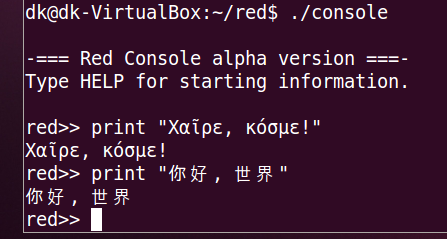
The new runtime lexer is now powering the Red console, so we finally have proper Unicode input support!

A help system has also been provided, including the following functions: help, what and source. Try them from the console!

From the console code, the line editing features have been extracted in a different source file that can be now included in your Red programs when you need user input support. For that, two new functions have been provided (working like in Rebol): input and ask.

Moreover, a new branch was started in order to provide cross-platform line editing capabilities without the burden of external dependencies that have proved to be problematic and limited. The new vt100 version should work fine, but it is unfinished. Contributors with deep terminal coding experience are welcome to help improve the current code. We are aiming at a cross-platform console engine that could be used both in CLI and GUI apps.

Additional functions
  • New actions: absolute, remainder, complement, power, odd?, even?, and, or, xor, reverse
  • New natives: complement?, positive?, negative?, min, max, shift, to-hex
  • New operators: <<, >>, >>>
A new option was added to the system function: system/interpreted?, that will return true if the code is run by the interpreter (remember that do invokes the interpreter until we get JIT-compilation abilities).

Parse and load have been extended to accept a /part refinement.

Infix operators can now be created from existing functions or routines.

A first call function implementation has been contributed by Bruno Anselme with support for both Red and Red/System.

FreeBSD support

Yes, we got it now! :-) All thanks to Richard Nyberg who kindly provided us with the low-level patches required to make Red work on FreeBSD.

Red/System changes

The Red/System lexer used to be simply the load native from Rebol, which was a great way to speed up the development at the beginning, but was also limitating the syntax to only what Rebol2 accepts. Now the Red/System lexer uses the same code as the Red lexer (the compiler version, not the runtime one), freeing the Red/System syntax from the limitations and making it truly a dialect of Red!

Literal arrays support has been added also in order to facilitate initialization of arrays of value (until we get a first class array! datatype).

CPU registers read/write access has been added. It will be extended in the future to support special registers (like status flags register).

The maximum number of function local variables supported by Red/System was limited to 16, this was limitating also the number of local words that could be used in a Red function. This limitation has now been raised much higher, at least 512 local variables are now allowed.

Work in progress...

Object support is already present in this release, but is it not official yet, as it is supported by the interpreter only and not the compiler. Expect quick progress on this front.

The Android GUI support is also under heavy work in the android branch. In order to implement a proper GUI API, the implementation of a VID-like dialect has started, with Android as first back-end. Windows support should follow shortly, then Linux (most probably using GTK+) and finally MacOSX (once we implement the objective-c bridge).

Gear second!

I am not made of rubber, but I can go gear second too! ;-) You may have not noticed, but the project is rapidly growing up in the last months. It is moving faster and on a larger scale as more contributors are joining. We also get better organized. This is the github stats for just this month:


The most important power-up we got was the addition of Xie Qingtian (aka qtxie) to the Red core team. Xie is an amazingly skilled young programmer from China, who is contributing to Red since more than a year now. But the thing is that he is working full time on Red project now, thanks to the kind sponsoring of CSDN and his CEO, Jiang Tao. Xie is the one who implemented all the new functions listed above and in a short amount of time! So consider that from now on, Red will be advancing twice faster thanks to him! ;-)

In order to organize better the work on Red, we are now using extensively Trello as our main task manager tool. The Red tasks board contains three main lists:

  • "Work in progress": for features we are working on.
  • "Road to 1.0": lists the required features for 1.0 version.
  • "Milestones": helps us organize upcoming releases.

Last but not least, the number of visitors on this site and the github repo has, at least, doubled since new year, thanks to an article on CSDN about Red, our Google Summer of Code campaign and the successful StackOverflow ad campaign (finished earlier this month) run by HostileFork, that brought us more than 10k new visitors who clicked the ad, making it the most clicked ad on SO since the new year! The ad is still visible here.

Big thank to all the people that have contributed to this (big) release. Enjoy it! :-)
Fork me on GitHub